.png?width=260&height=102&name=ASKBOSCO_Logo_Grey_RGB%20(6).png)
Navigation
New ASK BOSCO® AI Analyst - March 2026
What's new in the March 2026 Update to ASK BOSCO® AI Analyst?
AI Analyst has introduced significant improvements over previous versions:
- Autonomous analysis — Translates natural language to data queries, plans analysis, and delivers insights.
- Narrative insights: Provides rich text summaries explaining why your data looks the way it does. Provides insights, not just charts.
- Automatic Model selection: Identifies and queries across multiple data models at the same time and selects the most relevant data source(s) based on your question.
- Clarification requests — Asks questions when uncertain instead of guessing.
- Data-awareness: Now securely reads the specific results of your query to write accurate insights and answer follow-up questions with full context.
-
Insight storage and chat history: Generates insights from your data and stores them as your conversation history within AI Analyst.
-
Data security: Processes only the data needed to answer your question and the system operates strictly within a defined dataset and analytical framework.
The AI cannot act outside its configured data environment, and all outputs are directly traceable to the underlying dataset. Your data is used only to generate insights and is never stored or used for training. -
Analyst-grade, transparent reasoning: Creates a plan, validates assumptions, and self-corrects to provide you verifiable results. Shows analysis steps in plain language.
-
Multi-turn conversation: You can ask follow-up questions, request explanations, and explore the "why" behind the numbers. Its smarter context detects new questions, versus follow-ups, automatically.
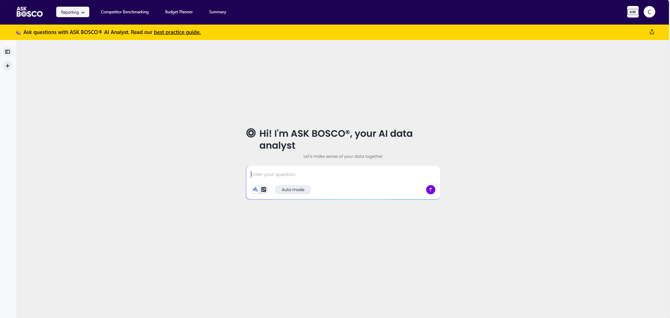
Our best practices to help you master your conversations with AI Analyst.
Ask effective questions
Be specific about your intent.
AI Analyst handles open-ended questions but uses its own judgment to plan analysis. This could result in you not getting the answer you were aiming for. Specify dimensions explicitly if needed.
|
Less effective |
More effective |
|
"How are sales doing?" |
"How are sales doing? I expect analysis at channel and campaign level." |
|
"Show me device data." |
"Show me device traffic and cost by channel." |
|
"What’s our performance?" |
"Revenue performance this quarter. Compare it against last quarter and same quarter last year." |
Use Research Mode for Complex Analysis
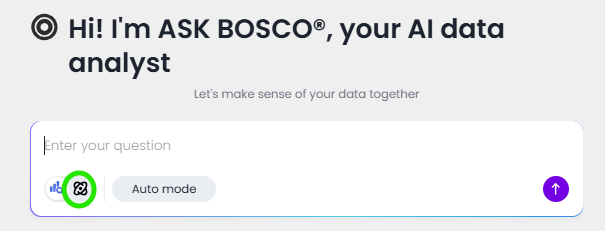
Research mode introduces a process where AI Analyst reasons through a problem like a human analyst.
-
Extended planning: Unlike the default Search mode, Research Mode creates a multi-step query plan to simplify complex questions. It identifies ambiguities, generates testable hypotheses, and allows users to modify the analytical path before execution.
-
Iterative self-correction: If an anomaly is detected, the agent autonomously deep-dives, self-corrects its logic, and refines subqueries until it reaches a grounded conclusion.
-
Automated narrative summary: The final output is a coherent report that explains the “why” and “what’s next,” citing specific data points and visualizations to build trust, structured in a detailed report.
|
|
Search Mode |
Research Mode |
|
Reasoning/Thinking time |
Low: Optimized to be fast |
High: Optimized to be comprehensive |
|
Prompt depth |
Single-dimensional (“What”) |
Multidimensional (“Why” and “what if”) |
|
Output type |
Direct answer or visual |
Comprehensive decision report |
Use Auto Mode
Use Auto mode if you don’t know which Data Model to use.
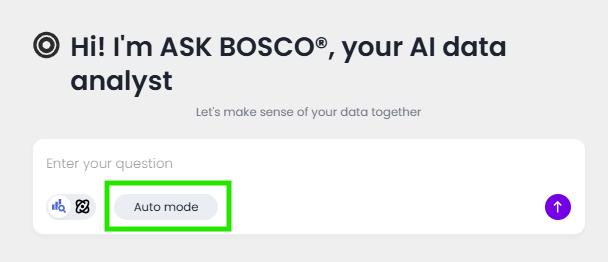
Auto mode also supports cross-source queries in case you want to query data from multiple sources to generate insights
Manual data model selection improves accuracy when models have overlapping data. Select the model, not Auto mode, if you know which model your question relates to.
Brainstorm with AI Analyst
Provide role context to get analysis suggestions:
"I'm a Paid Social account manager focused on awareness driving. What metrics should I review?"
"I am a Buying and Merchandising Director. What data will help me to maximize margin?"
"I manage Affiliates. What questions should I ask about our partners performance?"
Troubleshooting
ASK BOSCO® AI Analyst is a powerful tool, but its outputs should always be evaluated critically.
Unsure about a response
- Ask AI Analyst to explain its analysis.
- Ask AI Analyst to verify its analysis or double-check a specific result.
Request clarification
If results seem incorrect, ask AI Analyst to explain:
"How did you calculate that percentage?"
"Why did you exclude those channels?"
"Double-check this calculation"
Identify non-data responses
AI Analyst can answer open-ended questions, but ambiguous queries may produce responses from general knowledge instead of your data.
Signs of a non-data response:
- Generic-sounding answer
- No specific numbers from your data
- Reasoning block shows no data queries
When in Deep Analysis
Always review the analysis plan before approval. Add specific dimensions or comparisons you need.
- Expect longer processing time for thorough analysis.
- Remove irrelevant steps to save time and cost.
- Don’t close the tab while running Research mode to ensure AI Analyst finishes its analysis.
Auto mode
Works best when the overlap between available data models is low. It may return options for which models it can use to answer your question, and you can choose.
- For overlapping models, specify the data model name if you already know it.
- Ask AI Analyst to run queries on multiple models if you cannot choose.
-
Ask AI Analyst to share more details about suggested data models if you need help deciding.
Out of Scope
AI analyst does not cover the data that is provided for the following sections of ASK BOSCO® at this time.
-
the Summary Page
-
Budget Planner
- the Competitor Benchmarking
You can find out more about these sections in our other articles
Further reading on questions in ASK BOSCO® AI Analyst can be found here
Article - A Guide to asking questions in ASK BOSCO® AI Analyst
That completes our Best Practice Advice. If you have any questions please contact team@askbosco.io
Where would you like to go next?
In this Unit
Article - Using ASK BOSCO® AI Analyst
Demo - Using ASK BOSCO® AI Analyst
In other Units
- Editing
Article - Editing ASK BOSCO® AI Analyst Insights
Demo - Editing ASK BOSCO® AI Analyst Insights
- ASK BOSCO® AI Analyst in Dashboard Visualizations
Article - Dashboard visualizations and ASK BOSCO® AI Analyst