---
title: Article - Editing ASK BOSCO® AI Analyst Insights
description: How to edit visualizations in ASK BOSCO® AI Analyst
---
[Skip to content](https://info.askbosco.io/knowledge/article-editing-ask-bosco-ai-analyst-insights#main-content)
English
Show submenu for translations
[](https://app.askbosco.io/)
- [Book a call with our team](https://modo25.com/book-a-call/)
Open main navigation
Close main navigation
- [Book a call with our team](https://modo25.com/book-a-call/)
- English
Show submenu for translations
- [Contact us](mailto:team@askbosco.io)
[Contact us](mailto:team@askbosco.io)
How can we help you?
- There are no suggestions because the search field is empty.
1. [Here to Help](https://info.askbosco.io/knowledge?hsLang=en)
2. [ASK BOSCO® Training](https://info.askbosco.io/knowledge/ask-bosco-training?hsLang=en)
3. [ASK BOSCO® AI Analyst](https://info.askbosco.io/knowledge/ask-bosco-training?hsLang=en#ask-bosco-ai-analyst)
# Article - Editing ASK BOSCO® AI Analyst Insights
## In this unit you will learn how to edit ASK BOSCO® AI Analyst visualizations.
### Navigation
[Using Edit Mode to Modify the Visualization](https://info.askbosco.io/knowledge/article-editing-ask-bosco-ai-analyst-insights#Edit_mode)
[Editing Visualizations by Drilling Down](https://info.askbosco.io/knowledge/article-editing-ask-bosco-ai-analyst-insights#drilling_down)
[Querying the SQL](https://info.askbosco.io/knowledge/article-editing-ask-bosco-ai-analyst-insights#SQL)
[When You Have Finished Editing](https://info.askbosco.io/knowledge/article-editing-ask-bosco-ai-analyst-insights#finished)
---
### Getting Started with a Conversation
Having completed the [Using ASK BOSCO® AI Analyst](https://info.askbosco.io/knowledge/article-using-ask-bosco-ai-analyst?hsLang=en) learning, you already know how to locate the AI analyst from the main menu.
So let's go there and start a new conversation. We'll ask the AI Analyst something about a data set.
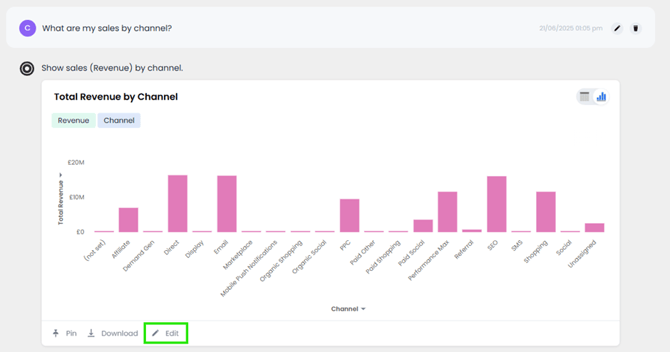
We’ll ask to see Sales by Channel. ASK BOSCO® AI Analyst reiterates our request, identifying that the word "sales" refers to "revenue".

[Back to top](https://info.askbosco.io/knowledge/article-editing-ask-bosco-ai-analyst-insights#contents)
---
### Using Edit Mode to Modify the Visualization
If you want full control over an answer, you can open the answer editor.
The answer shows total revenue by Channel in alphabetical order, but we wanted to see it in descending order.
You can Edit any answer, at any point in the conversation.
Click the edit button beneath ASK BOSCO® AI Analysts answer.
The resulting view will look like a familiar data experience.

The data panel on the left shows the existing measures, attributes, dates and formulas available.
You can edit search tokens directly into the search bar. To sort the data, type “sort by Revenue descending” in the search bar and click Go or press Enter.

If we want to add other measures or attributes, we can check and uncheck the relevant ones, then click Go to run the search.
If you want to change the chart type, click on the chart icon.
If you want to change its configuration, click on the gear icon.
For example, let's update the Total Revenue column colour in this chart. We just click on the measure we want to edit then we can update the colour.

We can also apply conditional formatting, let's do that for this Total Revenue column. To highlight columns less than £5M, let's use red for this rule.

Now the visualization has changed to the view we requested.

Click Done Editing.
[Back to top](https://info.askbosco.io/knowledge/article-editing-ask-bosco-ai-analyst-insights#contents)
---
### Editing Visualizations by Drilling Down
A quick way to edit ASK BOSCO® AI Analysts insights, is to drill down directly into the visualization.
In this example, let's say we want to explore which Device drove the most revenue in Performance Max.
If we right click on the data point we want to explore and click drill down, then choose the column with which we want to filter item type.

The visualization rebuilds to provide a Device level breakdown for Performance Max.

There are no limits to how many layers you can drill and we can use the back button to come back up by any number of layers.

So for example drilling down by date provides a view of the trend of Performance Max Revenue from Mobile.

[Back to top](https://info.askbosco.io/knowledge/article-editing-ask-bosco-ai-analyst-insights#contents)
---
### Querying the SQL
If you have more of a technical background you can always view the underlying SQL query for every answer.
ASK BOSCO®’s engine automatically compiles this.
Open query details to see it.

Then click on the button Query SQL, to view the Queries SQL code.
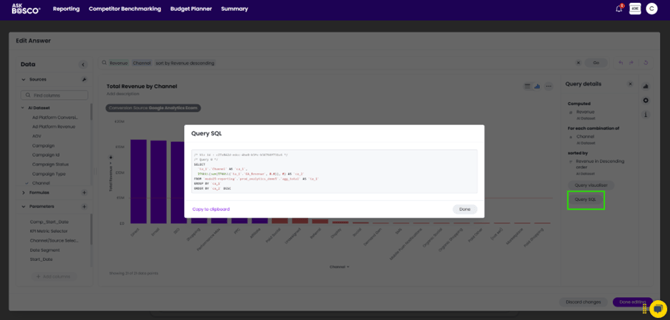
This full transparency ensures we can trust and explain how metrics are derived.
[Back to top](https://info.askbosco.io/knowledge/article-editing-ask-bosco-ai-analyst-insights#contents)
---
### When You Have Finished Editing
After completing your edits to an answer always be sure to save with the Done editing button.
Then you can return to your ASK BOSCO® AI Analyst conversation and pick up where you left off.
You can ask follow up questions building from the edited visualization and you can pin your edited visualization to a new or existing Dashboard.
[Back to top](https://info.askbosco.io/knowledge/article-editing-ask-bosco-ai-analyst-insights#contents)
---
Congratulations, now you can edit ASK BOSCO® AI Analyst answers effectively!
Why not log in to your account in [ASK BOSCO®](https://askbosco.io) and try it for yourself?
### What's Next?
- In this Unit
*The following article gives you the opportunity to view this content in a different format, depending on your preference*
*[Demo - Editing ASK BOSCO® AI Analyst Insights](https://info.askbosco.io/knowledge/demo-editing-ask-bosco-ai-analyst-insights?hsLang=en)*
In other Units
- Dashboard Visualizations
[Article - Dashboard Visualizations and ASK BOSCO® AI Analyst](https://info.askbosco.io/knowledge/article-dashboard-visualizations-and-ask-bosco-ai-analyst?hsLang=en)
[Demo - Dashboard Visualizations and ASK BOSCO® AI Analyst](https://info.askbosco.io/knowledge/demo-dashboard-visualizations-and-ask-bosco-ai-analyst?hsLang=en)
- Using ASK BOSCO® AI Analyst
[Best Practice - Asking Questions in ASK BOSCO® AI Analyst](https://info.askbosco.io/knowledge/best-practice-asking-questions-in-ask-bosco-ai-analyst?hsLang=en)
[Article - Using ASK BOSCO® AI Analyst](https://info.askbosco.io/knowledge/article-using-ask-bosco-ai-analyst?hsLang=en)
[Demo - Using ASK BOSCO® AI Analyst](https://info.askbosco.io/knowledge/demo-using-ask-bosco-ai-analyst?hsLang=en)
- [FAQs](https://info.askbosco.io/knowledge/faqs?hsLang=en#main-content)
- [Onboarding](https://info.askbosco.io/knowledge/faqs?hsLang=en#onboarding)
- [Knowledge Hub](https://info.askbosco.io/knowledge/knowledge-hub?hsLang=en#main-content)
- [Getting Started](https://info.askbosco.io/knowledge/knowledge-hub?hsLang=en#getting-started)
- [Data Connections & Integrations](https://info.askbosco.io/knowledge/knowledge-hub?hsLang=en#data-connections-integrations)
- [Onboarding & Implementation](https://info.askbosco.io/knowledge/knowledge-hub?hsLang=en#onboarding-implementation)
- [Using the Reporting Tools](https://info.askbosco.io/knowledge/knowledge-hub?hsLang=en#using-the-reporting-tools)
- [Product Updates & Features](https://info.askbosco.io/knowledge/knowledge-hub?hsLang=en#product-updates-features)
- [ASK BOSCO® Training](https://info.askbosco.io/knowledge/ask-bosco-training?hsLang=en#main-content)
- [Getting Started With ASK BOSCO® Training](https://info.askbosco.io/knowledge/ask-bosco-training?hsLang=en#getting-started-with-ask-bosco-training)
- [Module 1 - Introduction & Overview](https://info.askbosco.io/knowledge/ask-bosco-training?hsLang=en#module-1-introduction-overview)
- [Module 2 - Report Features & Analytics Basics](https://info.askbosco.io/knowledge/ask-bosco-training?hsLang=en#module-2-report-features-analytics-basics)
- [Module 3 - Budget Planning & Allocation](https://info.askbosco.io/knowledge/ask-bosco-training?hsLang=en#module-3-budget-planning-allocation)
- [ASK BOSCO® AI Analyst](https://info.askbosco.io/knowledge/ask-bosco-training?hsLang=en#ask-bosco-ai-analyst)
- [ASK BOSCO® Shopify App](https://info.askbosco.io/knowledge/ask-bosco-shopify-app?hsLang=en#main-content)
- [Getting Started with Shopify](https://info.askbosco.io/knowledge/ask-bosco-shopify-app?hsLang=en#getting-started-with-shopify)
- [Shopify Reporting](https://info.askbosco.io/knowledge/ask-bosco-shopify-app?hsLang=en#shopify-reporting)
- [Product Releases](https://info.askbosco.io/knowledge/product-releases?hsLang=en)
- [Data connections](https://info.askbosco.io/knowledge/data-connections?hsLang=en)
- [Book a call with our team](https://modo25.com/book-a-call/)
[](https://askbosco.io/)
One Embankment, Neville Street. Leeds. LS1 4DW.
Tel: +[44 20 3355 6741](tel:44%2020%203355%206741)
[mailto:email@email.com](mailto:email@email.com)
Copyright © 2025, ASK BOSCO®