.png?width=260&height=102&name=ASKBOSCO_Logo_Grey_RGB%20(6).png)
Inform decisions that maximise your profit
Make informed decisions while budget planning with ASK BOSCO's AI and statistical modelling that tells you where to invest your budgets for the best results. The Budget Planner combines your data with advanced statistical modelling to produce a forecast with over 90% proven accuracy.
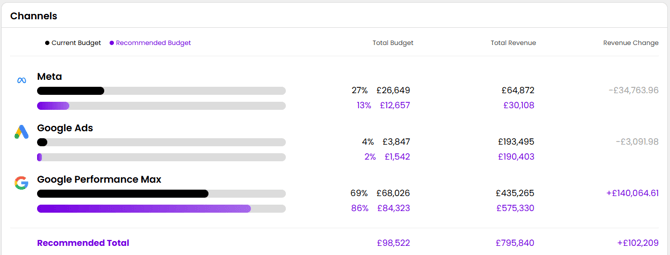
Budget Plan at a campaign-level with our recommendations and insights generated from a study of your historical data, taking the guesswork out of your forecasting.
Benchmark your marketing stats against your competitors
Gain visibility over competitor's online performance and how you stand in the current competitor landscape. ASK BOSCO® pulls in from reliable and reputable third-party sources to show you who's at the top and who's struggling to keep up.
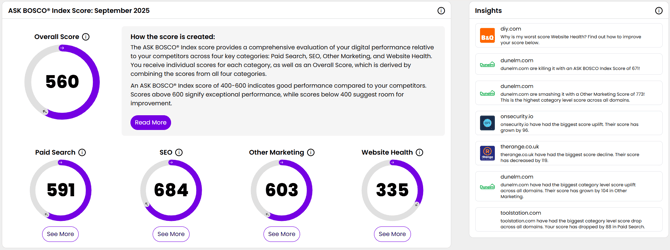
Monitor performance on multiple channels with our scoring system across key performance indicators anywhere from Paid Search to Website Health. Spot areas of improvement for yourself or identify strengths and weaknesses of your close competitors, all data is tracked over time so you can review the impact of your marketing efforts.
Real-time performance in one dashboard
ASK BOSCO® provides pre-built reports designed by experts that cover the essential metrics to ensure marketing success. Save time reporting using our centralized dashboard providing all your performance metrics together from all the data sources you connected.
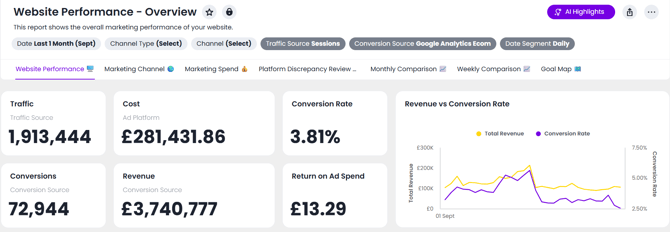
Uncover insights and trends immediately knowing that your data is updated on average every four hours, so your always up to date with the latest changes.
Customizing Your Reports
ASK BOSCO® allows you to build fully customizable, no-code reports tailored to your needs.
You can:
-
Edit the layout of existing reports
-
Add, remove, or rearrange charts
-
Adjust formatting and styling using the new Chart Settings panel
The updated Chart Settings experience gives you structured control over chart type, layout, formatting, labels, axes, and display options — all within a single, intuitive panel.
If you prefer to start from scratch, use the Report Builder to create a custom dashboard using your connected data sources. Choose from a range of visualization types and refine them using Basic or Advanced settings.
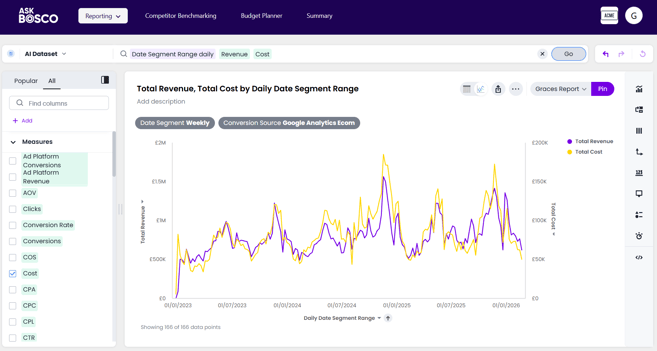
We also know that learning how to use a new software can be daunting, so feel free to use our Training Modules where we teach you the ins and outs of each feature and show what's truly possible with ASK BOSCO®.
https://info.askbosco.io/knowledge/unit-2.3-setting-up-customizing-dashboards
No time to scrutinize data? Ask our AI Analyst
Chat directly with your data using the AI Analyst for instant actionable insights. Using natural language you can ask our AI Analyst a question, receive an answer then drill down or follow up with more questions.
If you're unsure on the type of questions you can ask, we have an article that provides the best practise ways of working to so you can get the most out of your very own assistant.
https://info.askbosco.io/knowledge/ask-bosco-ai-analyst-quick-start-guide
Bring to life your dream dashboard
Turn natural language prompts into a customizable ready-to-use dashboard. AI studio will converse with you, make changes that you request, confirm it understands your prompts before updating the dashboard and provide areas it thinks your dashboard could be improved in.
You don't have to use it to create a dashboard by scratch, if there's a change you want to make to an existing dashboard, you can consult with AI Studio regardless. Utilize your very own BI assistant.
This article was created by Grace. If you have any questions or need a hand, feel free to reach out to us at team@askbosco.io

May 2026