---
title: Shopify Data Connection
description: How to connect Shopify in ASK BOSCO & the Shopify models and metrics available.
---
[Skip to content](https://info.askbosco.io/knowledge/shopify-data-connection#main-content)
English
Show submenu for translations
[.png?width=260&height=102&name=ASKBOSCO_Logo_Grey_RGB%20(6).png)](https://app.askbosco.io/)
- [Book a call with our team](https://modo25.com/book-a-call/)
Open main navigation
Close main navigation
- [Book a call with our team](https://modo25.com/book-a-call/)
- English
Show submenu for translations
- [Contact us](mailto:team@askbosco.io)
[Contact us](mailto:team@askbosco.io)
How can we help you?
- There are no suggestions because the search field is empty.
1. [Here to Help](https://info.askbosco.io/knowledge?hsLang=en)
2. [Data connections](https://info.askbosco.io/knowledge/data-connections?hsLang=en)
# Shopify Data Connection
## How to connect Shopify in ASK BOSCO & the Shopify data metrics available:
**How to connect:**
- Go to the Connections tab
- Click Connect on the Shopify tile
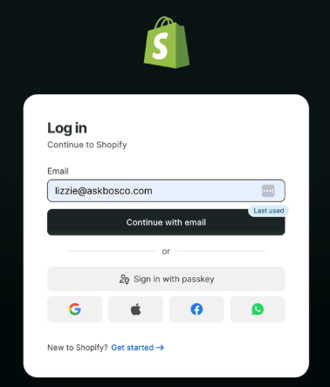
- Get taken to Shopify log in screen
- Log in to the Shopify account you want to connect
- Install the ASK BOSCO app from the Shopify app store
- Choose a billing plan
- Connection complete
### **Shopify data model and metrics available in ASK BOSCO®**
**Shopify Sales model**
- **Orders:** Number of unique orders placed.
- **Customer ID:** \[no description set\]
- **Product Compare At Price:** The original or list price of the product variant, used to calculate discounts. This represents the base price point from which any active sale discount is measured.
- **Product Price:** The current active selling price of the product variant. This is the price customers pay at checkout. For products without an active sale, this equals the original list price.
- **Customer Order Type:** Classifies each order by the customer's purchase history at the time of purchase: 'new' for a customer's first order, 'returning' for every order after that, and 'guest' for orders with no customer attached (identity unknown)… \[text cut off in original screenshot\]
- **Sales:** Sales based on the Sale Type that enables you to switch between Gross, Net and Total.
- **AOV:** Average Order Value, calculated as AOV = Sales / Orders.
- **Gross Profit:** Gross sales minus cost of goods sold (COGS).
- **Gross Margin:** Gross profit expressed as a percentage of gross sales.
- **Gross Sales:** Total item revenue before discounts and returns.
- **Net Sales:** Sales revenue after discounts and returns have been applied.
- **Taxes:** Total tax amount charged on orders.
- **Returns:** Total monetary value returned to customers.
- **Order Date:** The date the order was created in Shopify.
- **Hour:** Hour of day (0–23) when the order was created in Shopify.
- **Daily Sales Target:** User-defined daily sales goal for sales.
- **Is In Date Range:** Indicates whether the date is in the date range filter (true / false).
- **Return Date:** The date the return was processed in Shopify.
- **Total Sales:** Total spend of a customer (e.g. Net Sales + Taxes + Shipping).
- **Gross Returns:** Item value returned at original (pre-discount) prices, ex-tax.
- **Net Return:** Actual money paid out on reversals — Returns minus discounts returned, plus any merchant-retained adjustments (restocking fees, cash rounding). Shopify's "Net Returns" / "Reversals" KPI.
- **Returned Quantity Rate:** Ratio of quantity returned to quantity sold.
- **Product Image:** Primary image associated with the product variant, displayed for visual reference.
- **Product URL:** Clickable URL linking directly to the product's page in the storefront.
- **Date:** Order date or return date, depending on the Return Attribution Date selection.
- **KPI Chart Date Range:** Indicates whether the date is in the date range for the KPI charts (true / false).
- **Shipping Return:** Total shipping amount refunded to customers.
- **Shipping Tax:** Taxes for shipping charges.
- **Shipping Discount:** Amount discounted by shipping-specific discounts.
- **Sale Taxes:** Taxes applied to sales.
- **Shipping Method:** Delivery option selected for an order (for example, Standard, Express, or Local Pickup).
- **Product Type:** High-level category or label assigned to a product to group similar items for reporting, filtering, and analysis.
- **Product Description:** Text describing the product's features, materials, and benefits for customers.
- **Quantity Ordered:** Total number of items ordered, before returns.
- **Order Id:** Unique Shopify identifier for an order.
- **Product Variant Display Name:** Combined product and variant name (e.g. T-Shirt – Large / Blue).
- **Product Vendor:** Vendor or brand assigned to the product in Shopify.
- **Product Title:** The product name as displayed to customers in Shopify.
- **Product Variant Title:** The variant name (e.g. size or colour) as defined in Shopify.
- **Product Variant Sku:** The SKU assigned to the specific product variant in Shopify.
- **Is Test:** Indicates whether the order was placed using a Shopify test payment gateway (true / false).
- **Product Variant Id:** Unique Shopify identifier for a specific product variant.
- **Product Id:** Unique Shopify identifier for a product, shared across all variants.
- **Restocked:** Indicates whether a returned product has been restocked into inventory (true / false).
- **Taxes Returned:** Total tax amount returned to customers.
- **Return Quantity:** Total number of items returned.
- **Transaction Type:** Type of transaction: Sale, Return, Shipping, or Adjustment.
- **Shipping Charges:** Total shipping paid by customers.
- **Applied Discounts:** Total monetary amount of discounts applied to sales.
- **Discounts Returned:** Total value of discounts returned as part of returns.
- **Return Discount Tax:** Tax value of a discount reversed when discounted items are returned.
- **Discounts:** Amount discounted from sales revenue.
- **Period Type:** Indicates whether the date is in the date range filter for comparisons. Selected, the current date range selected, Comparision, the date range comparing to or Other, all other dates.
- **Cost Of Goods Sold:** Cost of goods sold (COGS) associated with items sold.
- **Total Sales (Returning):** Total customer refund — net returns plus taxes returned and shipping refunded.
- **First Order Date:** The date when the customer placed their first order in the store. Used to track customer acquisition timing and calculate customer tenure.
- **Total Orders:** The total number of orders placed by the customer over their lifetime. Used to measure customer engagement and identify high-frequency buyers.
- **Customer Order Rank:** Sequential order number for each customer, starting at 1 for their first valid order and incrementing by 1 for each subsequent order. Valid orders exclude test orders and guest checkout orders.
**Shopify Product model**
- **Product Variant Display Name:** Combined product and variant name (e.g. T-Shirt – Large / Blue).
- **Product Price:** The current active selling price of the product variant. This is the price customers pay at checkout. For products without an active sale, this equals the original list price.
- **Product Compare At Price:** The original or list price of the product variant, used to calculate discounts. This represents the base price point from which any active sale discount is measured.
- **Applied Discounts:** Total value of discounts applied to orders.
- **Discounts Returned:** Total value of discounts refunded as part of returns.
- **Shipping Charges:** Total shipping paid by customers.
- **Taxes:** Total tax amount charged on orders.
- **Order Date:** The date the order was created in Shopify.
- **Product Image:** Primary image associated with the product variant, displayed for visual reference.
- **Product URL:** Clickable URL linking directly to the product's page in the storefront.
- **Return Date:** The date the refund was processed in Shopify.
- **Date:** \[no description set\]
- **Is In Date Range:** Indicates whether the date is in the date range filter (true / false).
- **Gross Sales:** Total item revenue before discounts and returns.
- **Total Sales (Returning):** Total customer refund — net returns plus taxes returned and shipping refunded.
- **Gross Returns:** Item value returned at original (pre-discount) prices, ex-tax.
- **Net Return:** Actual money paid out on reversals — Returns minus discounts returned, plus any merchant-retained adjustments (restocking fees, cash rounding). Shopify's "Net Returns" / "Reversals" KPI.
- **Returned Quantity Rate:** Ratio of quantity returned to quantity sold.
- **Discounts:** Amount discounted from sales revenue
- **Net Sales:** Sales revenue after discounts and refunds have been applied.
- **Total Sales:** Total spend of a customer (e.g. Net Sales + Taxes + Shipping).
- **Sales:** Sales based on the Sale Type that enables you to switch between Gross, Net and Total.
- **Stock Level:** Displays a stock quantity based on the selected Stock Status parameter. Dynamically switches between inventory status quantities.
- **Quantity Restocked:** Quantity of product variants designated to be returned to available stock after processing (e.g. approved returns).
- **Gross Profit:** Gross sales minus cost of goods sold (COGS).
- **Gross Margin:** Gross profit expressed as a percentage of gross sales.
- **Restock Rate:** The percentage of products that are returned to store.
- **Returns:** Customer-paid value of returned items (gross\_returns minus discounts\_returned), ex-tax.
- **Is Test:** Indicates whether the order was placed using a Shopify test payment gateway (true / false).
- **Return Reason:** The reason why a customer has returned part or the full order.
- **Quantity Ordered:** Total number of items ordered, before refunds or returns.
- **Quantity Returned:** Total number of individual items refunded or returned.
- **Reserved Quantity:** Quantity of product variants that have been reserved
- **Available Quantity:** Quantity of product variants currently available for sale. Excludes stock reserved, damaged, or otherwise unavailable.
- **Committed Quantity:** Quantity of product variants reserved or allocated to existing orders but not yet fulfilled.
- **Damaged Quantity:** Quantity of product variants marked as damaged and not available for sale.
- **Incoming Quantity:** Quantity of product variants expected to arrive into inventory but not yet received.
- **On Hand Quantity:** Quantity of product variants physically in stock and held at inventory locations.
- **Quality Control Quantity:** Quantity of product variants currently held for inspection or quality control and not available for sale.
- **Safety Stock Quantity:** Quantity of product variants reserved as safety stock and not intended for immediate sale.
- **Product Description:** Text describing the product's features, materials, and benefits for customers.
- **Product ID:** Unique Shopify identifier for a product, shared across all variants.
- **Product Title:** The product name as displayed to customers in Shopify.
- **Product Vendor:** Vendor or brand assigned to the product in Shopify.
- **Product Type:** High-level category or label assigned to a product to group similar items for reporting, filtering, and analysis.
- **Product Variant Sku:** The SKU assigned to the specific product variant in Shopify.
- **Product Variant Id:** Unique Shopify identifier for a specific product variant.
- **Product Variant Title:** The variant name (e.g. size or colour) as defined in Shopify.
- **Restocked:** Indicates whether a returned product has been restocked into inventory (true / false).
- **Order Id:** Unique Shopify identifier for an order.
- **Cost Of Goods Sold:** Cost of goods sold (COGS) associated with items sold.
**Shopify Discounts model**
- **Discounted Orders:** Number of unique orders where one or more discounts were applied.
- **Order Date:** The date the order was created in Shopify.
- **Discount Title:** The name of the discount as defined in Shopify at the time it was applied.
- **Applied Discounts:** Total value of discounts applied to orders.
- **Is In Date Range:** Indicates whether the date is in the date range filter (true / false).
- **Average Discounts Per Order:** \[no description set\]
- **Total Orders:** \[no description set\]
- **Discount %:** \[no description set\]
- **Discount Class:** Indicates what the discount applies to: the entire order, specific products, or shipping charges.
- **Discount Method:** How the discount was applied to the order (e.g. discount code or automatic discount rule).
- **Discount Type:** The structure of the discount (e.g. fixed amount off or percentage reduction).
- **Discount Summary:** Plain-language description of the discount, including its value and any eligibility rules (e.g. minimum spend, product restrictions).
- [FAQs](https://info.askbosco.io/knowledge/faqs?hsLang=en#main-content)
- [Onboarding](https://info.askbosco.io/knowledge/faqs?hsLang=en#onboarding)
- [Knowledge Hub](https://info.askbosco.io/knowledge/knowledge-hub?hsLang=en#main-content)
- [Getting Started](https://info.askbosco.io/knowledge/knowledge-hub?hsLang=en#getting-started)
- [Data Connections & Integrations](https://info.askbosco.io/knowledge/knowledge-hub?hsLang=en#data-connections-integrations)
- [Onboarding & Implementation](https://info.askbosco.io/knowledge/knowledge-hub?hsLang=en#onboarding-implementation)
- [Using the Reporting Tools](https://info.askbosco.io/knowledge/knowledge-hub?hsLang=en#using-the-reporting-tools)
- [Product Updates & Features](https://info.askbosco.io/knowledge/knowledge-hub?hsLang=en#product-updates-features)
- [ASK BOSCO® Training](https://info.askbosco.io/knowledge/ask-bosco-training?hsLang=en#main-content)
- [Getting Started With ASK BOSCO® Training](https://info.askbosco.io/knowledge/ask-bosco-training?hsLang=en#getting-started-with-ask-bosco-training)
- [Module 1 - Introduction & Overview](https://info.askbosco.io/knowledge/ask-bosco-training?hsLang=en#module-1-introduction-overview)
- [Module 2 - Report Features & Analytics Basics](https://info.askbosco.io/knowledge/ask-bosco-training?hsLang=en#module-2-report-features-analytics-basics)
- [Module 3 - Budget Planning & Allocation](https://info.askbosco.io/knowledge/ask-bosco-training?hsLang=en#module-3-budget-planning-allocation)
- [ASK BOSCO® AI Analyst](https://info.askbosco.io/knowledge/ask-bosco-training?hsLang=en#ask-bosco-ai-analyst)
- [ASK BOSCO® Shopify App](https://info.askbosco.io/knowledge/ask-bosco-shopify-app?hsLang=en#main-content)
- [Getting Started with Shopify](https://info.askbosco.io/knowledge/ask-bosco-shopify-app?hsLang=en#getting-started-with-shopify)
- [Shopify Reporting](https://info.askbosco.io/knowledge/ask-bosco-shopify-app?hsLang=en#shopify-reporting)
- [Product Releases](https://info.askbosco.io/knowledge/product-releases?hsLang=en)
- [Data connections](https://info.askbosco.io/knowledge/data-connections?hsLang=en)
- [Book a call with our team](https://modo25.com/book-a-call/)
[](https://askbosco.io/)
One Embankment, Neville Street. Leeds. LS1 4DW.
Tel: +[44 20 3355 6741](tel:44%2020%203355%206741)
[mailto:email@email.com](mailto:email@email.com)
Copyright © 2025, ASK BOSCO®