---
title: Rolling Date Filters
description: Learn how to use rolling date filters in ASK BOSCO® to keep your digital marketing reporting dashboard automatically up to date.
---
[Skip to content](https://info.askbosco.io/knowledge/rolling-date-filters#main-content)
English
Show submenu for translations
[.png?width=260&height=102&name=ASKBOSCO_Logo_Grey_RGB%20(6).png)](https://app.askbosco.io/)
- [Book a call with our team](https://modo25.com/book-a-call/)
Open main navigation
Close main navigation
- [Book a call with our team](https://modo25.com/book-a-call/)
- English
Show submenu for translations
- [Contact us](mailto:team@askbosco.io)
[Contact us](mailto:team@askbosco.io)
How can we help you?
- There are no suggestions because the search field is empty.
1. [Here to Help](https://info.askbosco.io/knowledge?hsLang=en)
2. [Knowledge Hub](https://info.askbosco.io/knowledge/knowledge-hub?hsLang=en)
3. [Product Updates & Features](https://info.askbosco.io/knowledge/knowledge-hub?hsLang=en#product-updates-features)
# Rolling Date Filters
**Overview**
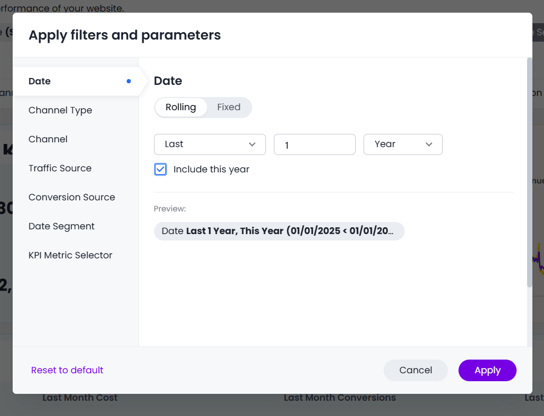
Rolling date filters have been enhanced to allow users to include the current time period within rolling date selections.
For example, users can now filter data using options such as:
- Last 3 months including this month
- Last 12 weeks including this week
- Year to date including today
This makes date filtering more flexible for live reporting and ongoing performance analysis.
****
---
**What Has Changed?**
Users can now:
- Include the current period in rolling date filters
- Create more dynamic date ranges
- Build reports that automatically stay up to date
- Reduce the need for manual date updates
**Best Practices**
We recommend:
- Using rolling filters for dashboards viewed regularly
- Checking whether the current period should be included before sharing reports
- Using consistent date logic across related dashboards
---
**Where This Applies**
This functionality affects:
- Dashboard filters
- Saved Vizualisations
- Reporting date controls
- Dashboards
---
**How to Use Rolling Date Filters**
1. Open a dashboard or report
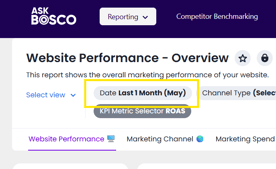
2. Select the date filter
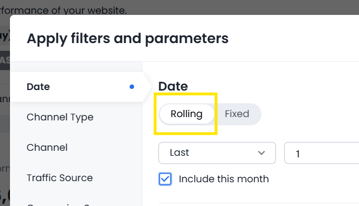
3. Choose a rolling date option
4. 
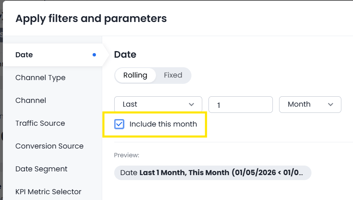
5. Enable the option to include the current period
6. Apply the filter
---
**Example Use Cases**
Examples include:
- Last 6 months including this month
- Quarter to date
- Month to date
- Last 30 days including today
This is particularly useful for ongoing performance monitoring and live dashboards.
This article was created by Grace. If you have any questions or need a hand, feel free to reach out to us at [**team@askbosco.io**](mailto:team@askbosco.io)[mailto:team@askbosco.io](mailto:team@askbosco.io)

May 2026
- [FAQs](https://info.askbosco.io/knowledge/faqs?hsLang=en#main-content)
- [Onboarding](https://info.askbosco.io/knowledge/faqs?hsLang=en#onboarding)
- [Knowledge Hub](https://info.askbosco.io/knowledge/knowledge-hub?hsLang=en#main-content)
- [Getting Started](https://info.askbosco.io/knowledge/knowledge-hub?hsLang=en#getting-started)
- [Data Connections & Integrations](https://info.askbosco.io/knowledge/knowledge-hub?hsLang=en#data-connections-integrations)
- [Onboarding & Implementation](https://info.askbosco.io/knowledge/knowledge-hub?hsLang=en#onboarding-implementation)
- [Using the Reporting Tools](https://info.askbosco.io/knowledge/knowledge-hub?hsLang=en#using-the-reporting-tools)
- [Product Updates & Features](https://info.askbosco.io/knowledge/knowledge-hub?hsLang=en#product-updates-features)
- [ASK BOSCO® Training](https://info.askbosco.io/knowledge/ask-bosco-training?hsLang=en#main-content)
- [Getting Started With ASK BOSCO® Training](https://info.askbosco.io/knowledge/ask-bosco-training?hsLang=en#getting-started-with-ask-bosco-training)
- [Module 1 - Introduction & Overview](https://info.askbosco.io/knowledge/ask-bosco-training?hsLang=en#module-1-introduction-overview)
- [Module 2 - Report Features & Analytics Basics](https://info.askbosco.io/knowledge/ask-bosco-training?hsLang=en#module-2-report-features-analytics-basics)
- [Module 3 - Budget Planning & Allocation](https://info.askbosco.io/knowledge/ask-bosco-training?hsLang=en#module-3-budget-planning-allocation)
- [ASK BOSCO® AI Analyst](https://info.askbosco.io/knowledge/ask-bosco-training?hsLang=en#ask-bosco-ai-analyst)
- [ASK BOSCO® Shopify App](https://info.askbosco.io/knowledge/ask-bosco-shopify-app?hsLang=en#main-content)
- [Getting Started with Shopify](https://info.askbosco.io/knowledge/ask-bosco-shopify-app?hsLang=en#getting-started-with-shopify)
- [Shopify Reporting](https://info.askbosco.io/knowledge/ask-bosco-shopify-app?hsLang=en#shopify-reporting)
- [Product Releases](https://info.askbosco.io/knowledge/product-releases?hsLang=en)
- [Data connections](https://info.askbosco.io/knowledge/data-connections?hsLang=en)
- [Book a call with our team](https://modo25.com/book-a-call/)
[](https://askbosco.io/)
One Embankment, Neville Street. Leeds. LS1 4DW.
Tel: +[44 20 3355 6741](tel:44%2020%203355%206741)
[mailto:email@email.com](mailto:email@email.com)
Copyright © 2025, ASK BOSCO®