---
title: Preparing for Onboarding
description: Find out how to prepare for ASK BOSCO® onboarding, so your digital marketing reporting dashboard is ready from day one.
---
[Skip to content](https://info.askbosco.io/knowledge/preparing-for-onboarding#main-content)
English
Show submenu for translations
[.png?width=260&height=102&name=ASKBOSCO_Logo_Grey_RGB%20(6).png)](https://app.askbosco.io/)
- [Book a call with our team](https://modo25.com/book-a-call/)
Open main navigation
Close main navigation
- [Book a call with our team](https://modo25.com/book-a-call/)
- English
Show submenu for translations
- [Contact us](mailto:team@askbosco.io)
[Contact us](mailto:team@askbosco.io)
How can we help you?
- There are no suggestions because the search field is empty.
1. [Here to Help](https://info.askbosco.io/knowledge?hsLang=en)
2. [Knowledge Hub](https://info.askbosco.io/knowledge/knowledge-hub?hsLang=en)
3. [Onboarding & Implementation](https://info.askbosco.io/knowledge/knowledge-hub?hsLang=en#onboarding-implementation)
# Preparing for Onboarding
## Make sure that your onboarding goes as smooth as possible to achieve your Marketing goals.
This guide will give you a heads-up on the information needed to complete our onboarding process and ensure you get exactly what you want from your dashboard.
Want to know what to expect from our Onboarding Process? Read this article taking you through the Onboarding Timeline - [ASK BOSCO® Onboarding Timeline: What to Expect](https://info.askbosco.io/knowledge/ask-bosco-onboarding-timeline-what-to-expect?hsLang=en)
---
### Onboarding Form
The Onboarding Form is used to capture information about the brand you are going to onboard onto ASK BOSCO®, from platform access to your financial calendar we will need a lot of information to get you setup on ASK BOSCO®.
Below is a demo of our Onboarding Form, showing the questions you will be expected to answer.
Onboarding Form Walkthrough
VIEW DEMO
---
### Onboarding Form - Brand Information
We need some basic brand information to start off the creation of your dashboard.
- Website URL - This will determine the brand we create a dashboard for.
- Sale Type - This will determine your default source of conversion.
- Reporting Week Start - This will determine how your weeks are setup in reporting e.g. Monday - Sunday.
- Financial Year Start - This will determine your week numbers throughout the year.
---
### Onboarding Form - Reporting Preferences
These questions help us personalize the reporting to how you'd like to see your data.
- KPI - This will determine the default KPI across all of your templated reports, don't worry we still have a list of all KPI you can swap between.
- Conversion Source - This will determine the default Conversion Source across all of your reports, since we are pulling conversions from different ad platforms.
- Events to Track - This will determine the events we track if you are Lead-gen client, giving you the ability to report each event separately.
- Reporting Currency - This will determine the currency you see in your dashboard.
💡 *Tip: Everything here can be updated, if your preferences change in the future.*
---
### Onboarding Form - Platform Access
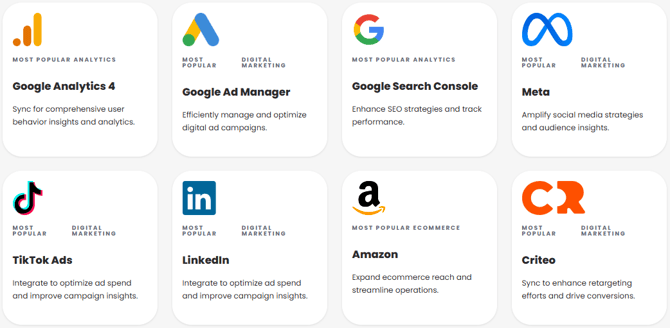
The most important step of the onboarding process, is laying out the platforms you'd like to connect and then providing access to said platforms.
- Make sure key stakeholders have had their say in which platforms they'd like to connect, so you don't miss any potential platforms that your brand uses.
- Make sure you know your account details on these platforms and have admin access to be able to authorize access/link requests. If you don't know this, then ask for help from someone who has the necessary access or knowledge.
- We provide guides on how to give access to the list of platforms we offer if you find yourself stuck.
---
### Who to Include in the Onboarding Process
As mentioned in the section above, you may need to ask for assistance when providing access to platforms.
Including the stakeholders that will be using the platform, may prove useful in adding any information they may have from being hands on with the accounts day-to-day. Including them early will inform them of ASK BOSCO® ahead of the training sessions that take place once your dashboard is setup.
This article was created by Louis. If you have any questions or need a hand, feel free to reach out to us at [team@askbosco.io](mailto:team@askbosco.io)
.png?width=89&height=89&name=New_Roundels_Louis%20(1).png)
January 2026
- [FAQs](https://info.askbosco.io/knowledge/faqs?hsLang=en#main-content)
- [Onboarding](https://info.askbosco.io/knowledge/faqs?hsLang=en#onboarding)
- [Knowledge Hub](https://info.askbosco.io/knowledge/knowledge-hub?hsLang=en#main-content)
- [Getting Started](https://info.askbosco.io/knowledge/knowledge-hub?hsLang=en#getting-started)
- [Data Connections & Integrations](https://info.askbosco.io/knowledge/knowledge-hub?hsLang=en#data-connections-integrations)
- [Onboarding & Implementation](https://info.askbosco.io/knowledge/knowledge-hub?hsLang=en#onboarding-implementation)
- [Using the Reporting Tools](https://info.askbosco.io/knowledge/knowledge-hub?hsLang=en#using-the-reporting-tools)
- [Product Updates & Features](https://info.askbosco.io/knowledge/knowledge-hub?hsLang=en#product-updates-features)
- [ASK BOSCO® Training](https://info.askbosco.io/knowledge/ask-bosco-training?hsLang=en#main-content)
- [Getting Started With ASK BOSCO® Training](https://info.askbosco.io/knowledge/ask-bosco-training?hsLang=en#getting-started-with-ask-bosco-training)
- [Module 1 - Introduction & Overview](https://info.askbosco.io/knowledge/ask-bosco-training?hsLang=en#module-1-introduction-overview)
- [Module 2 - Report Features & Analytics Basics](https://info.askbosco.io/knowledge/ask-bosco-training?hsLang=en#module-2-report-features-analytics-basics)
- [Module 3 - Budget Planning & Allocation](https://info.askbosco.io/knowledge/ask-bosco-training?hsLang=en#module-3-budget-planning-allocation)
- [ASK BOSCO® AI Analyst](https://info.askbosco.io/knowledge/ask-bosco-training?hsLang=en#ask-bosco-ai-analyst)
- [ASK BOSCO® Shopify App](https://info.askbosco.io/knowledge/ask-bosco-shopify-app?hsLang=en#main-content)
- [Getting Started with Shopify](https://info.askbosco.io/knowledge/ask-bosco-shopify-app?hsLang=en#getting-started-with-shopify)
- [Shopify Reporting](https://info.askbosco.io/knowledge/ask-bosco-shopify-app?hsLang=en#shopify-reporting)
- [Product Releases](https://info.askbosco.io/knowledge/product-releases?hsLang=en)
- [Data connections](https://info.askbosco.io/knowledge/data-connections?hsLang=en)
- [Book a call with our team](https://modo25.com/book-a-call/)
[](https://askbosco.io/)
One Embankment, Neville Street. Leeds. LS1 4DW.
Tel: +[44 20 3355 6741](tel:44%2020%203355%206741)
[mailto:email@email.com](mailto:email@email.com)
Copyright © 2025, ASK BOSCO®