.png?width=260&height=102&name=ASKBOSCO_Logo_Grey_RGB%20(6).png)
Locating Dashboards
To view your available Dashboards:
- From the menu at the top of the page, select Reporting.
- You’ll then see a list of options available to you.
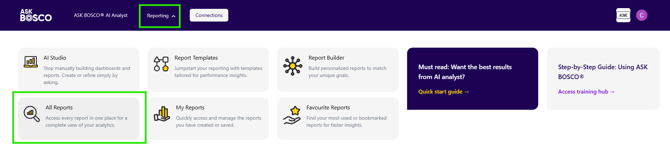
- Click on All Reports
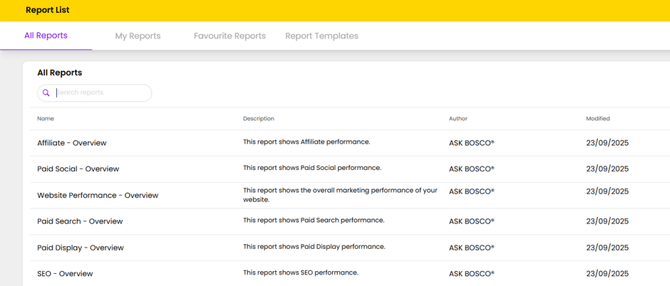
The All Reports tab provides a complete view of every report available within your ASK BOSCO® account. This includes platform-specific reports, overview summaries, and any shared reports created by you or your team.
From this screen, you can:
- Search for reports using the search bar at the top.
- View the report name, description, author, and last modified date.
- Access reports covering performance areas such as Paid Search, SEO, Affiliate, Display, and Website Performance.
This section makes it easy to find and open the exact report you need without navigating through multiple dashboards or folders.
4. My Reports shows the reports that you have created or that other users have shared with you
5. The Template Reports tab will display any system generated templates provided for your use-case.
Favouriting Dashboards
Favouriting a Dashboard makes it easier to find the ones you use most often.
To favourite a Dashboard:
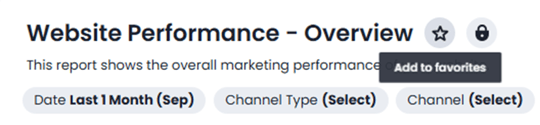
- Click to open the Dashboard you want to favourite.
- Click the star icon next to it.
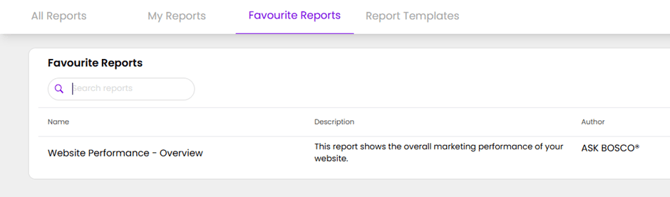
Your favourite Dashboards will appear in the Favourites section at the top of your Dashboard list.
Sharing and Downloading Dashboards
Once you've found the Dashboard you're after, there are a few ways to share or download it:
- Share with a named user or group — add a teammate or client by name/email (or a group), and choose whether they can view or edit the Dashboard.
- Copy a direct link — use Share → Copy link to get a link straight to that Dashboard, handy for pasting into an email. The recipient still needs to have been granted view or edit access for the link to work.
- Download as a PDF — choose PDF (continuous) (the new default, matching what you see on screen) or PDF (legacy) if you prefer the older layout.
This article was created by Grace. If you have any questions or need a hand, feel free to reach out to us at team@askbosco.io

Updated September 2026