---
title: Google Search Console (GSC) Data Connection
description: How to connect Google Search Console in ASK BOSCO & the model and metrics available.
---
[Skip to content](https://info.askbosco.io/knowledge/gsc-data-connection#main-content)
English
Show submenu for translations
[.png?width=260&height=102&name=ASKBOSCO_Logo_Grey_RGB%20(6).png)](https://app.askbosco.io/)
- [Book a call with our team](https://modo25.com/book-a-call/)
Open main navigation
Close main navigation
- [Book a call with our team](https://modo25.com/book-a-call/)
- English
Show submenu for translations
- [Contact us](mailto:team@askbosco.io)
[Contact us](mailto:team@askbosco.io)
How can we help you?
- There are no suggestions because the search field is empty.
1. [Here to Help](https://info.askbosco.io/knowledge?hsLang=en)
2. [Data connections](https://info.askbosco.io/knowledge/data-connections?hsLang=en)
# Google Search Console (GSC) Data Connection
## How to connect GSC in ASK BOSCO & the GSC data metrics available:
**How to connect:**
1. Go to the Connections tab and navigate to the Connector Library
2. Click Connect on the Google Search Console tile
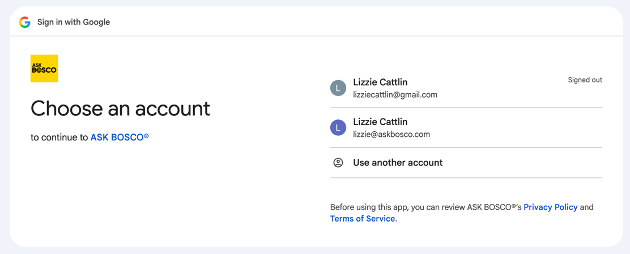
3. You will be redirected to Google Sign in page
4. Log in to the Google account that has access to the domain/s you want to connect
5. Approve ASK BOSCO access to the account
6. Select the domain/s you want to connect
7. Connection complete
### **GSC data model and metrics available in ASK BOSCO®**
**Models**
**Google Search Console model**
- **Date:** The specific day for which data is reported.
- **Query:** A search term or phrase that users entered into Google Search.
- **Brand Non Brand:** Brand classification of the search query, based on the customer-supplied branded SEO terms.
- **Landing Page:** Full URL of the page as reported by Google Search Console.
- **Page Path:** Path component of the page URL, excluding query string and fragment.
- **Hostname:** The domain where the tracked event occurred.
- **Protocol:** A set of rules or the "language" that a browser uses to communicate with a website server. For example, http or https.
- **Search Type:** A specific format of information a person is looking for, such as a traditional webpage, an image, a video, or a news article.
- **Account Name:** Site URL of the Search Console property the data belongs to.
- **Clicks:** The number of times users clicked on an ad or link.
- **Impressions:** The number of times an ad or search result was shown.
- **Position:** The impression-weighted average ranking position of the page for this query in search results.
- [FAQs](https://info.askbosco.io/knowledge/faqs?hsLang=en#main-content)
- [Onboarding](https://info.askbosco.io/knowledge/faqs?hsLang=en#onboarding)
- [Knowledge Hub](https://info.askbosco.io/knowledge/knowledge-hub?hsLang=en#main-content)
- [Getting Started](https://info.askbosco.io/knowledge/knowledge-hub?hsLang=en#getting-started)
- [Data Connections & Integrations](https://info.askbosco.io/knowledge/knowledge-hub?hsLang=en#data-connections-integrations)
- [Onboarding & Implementation](https://info.askbosco.io/knowledge/knowledge-hub?hsLang=en#onboarding-implementation)
- [Using the Reporting Tools](https://info.askbosco.io/knowledge/knowledge-hub?hsLang=en#using-the-reporting-tools)
- [Product Updates & Features](https://info.askbosco.io/knowledge/knowledge-hub?hsLang=en#product-updates-features)
- [ASK BOSCO® Training](https://info.askbosco.io/knowledge/ask-bosco-training?hsLang=en#main-content)
- [Getting Started With ASK BOSCO® Training](https://info.askbosco.io/knowledge/ask-bosco-training?hsLang=en#getting-started-with-ask-bosco-training)
- [Module 1 - Introduction & Overview](https://info.askbosco.io/knowledge/ask-bosco-training?hsLang=en#module-1-introduction-overview)
- [Module 2 - Report Features & Analytics Basics](https://info.askbosco.io/knowledge/ask-bosco-training?hsLang=en#module-2-report-features-analytics-basics)
- [Module 3 - Budget Planning & Allocation](https://info.askbosco.io/knowledge/ask-bosco-training?hsLang=en#module-3-budget-planning-allocation)
- [ASK BOSCO® AI Analyst](https://info.askbosco.io/knowledge/ask-bosco-training?hsLang=en#ask-bosco-ai-analyst)
- [ASK BOSCO® Shopify App](https://info.askbosco.io/knowledge/ask-bosco-shopify-app?hsLang=en#main-content)
- [Getting Started with Shopify](https://info.askbosco.io/knowledge/ask-bosco-shopify-app?hsLang=en#getting-started-with-shopify)
- [Shopify Reporting](https://info.askbosco.io/knowledge/ask-bosco-shopify-app?hsLang=en#shopify-reporting)
- [Product Releases](https://info.askbosco.io/knowledge/product-releases?hsLang=en)
- [Data connections](https://info.askbosco.io/knowledge/data-connections?hsLang=en)
- [Book a call with our team](https://modo25.com/book-a-call/)
[](https://askbosco.io/)
One Embankment, Neville Street. Leeds. LS1 4DW.
Tel: +[44 20 3355 6741](tel:44%2020%203355%206741)
[mailto:email@email.com](mailto:email@email.com)
Copyright © 2025, ASK BOSCO®