---
title: Getting Started with ASK BOSCO® AI Studio
description: Get started building custom digital marketing reporting dashboards with ASK BOSCO® AI Studio, step by step.
---
[Skip to content](https://info.askbosco.io/knowledge/getting-started-with-ask-bosco-ai-studio#main-content)
English
Show submenu for translations
[.png?width=260&height=102&name=ASKBOSCO_Logo_Grey_RGB%20(6).png)](https://app.askbosco.io/)
- [Book a call with our team](https://modo25.com/book-a-call/)
Open main navigation
Close main navigation
- [Book a call with our team](https://modo25.com/book-a-call/)
- English
Show submenu for translations
- [Contact us](mailto:team@askbosco.io)
[Contact us](mailto:team@askbosco.io)
How can we help you?
- There are no suggestions because the search field is empty.
1. [Here to Help](https://info.askbosco.io/knowledge?hsLang=en)
2. [Knowledge Hub](https://info.askbosco.io/knowledge/knowledge-hub?hsLang=en)
3. [Product Updates & Features](https://info.askbosco.io/knowledge/knowledge-hub?hsLang=en#product-updates-features)
# Getting Started with ASK BOSCO® AI Studio
## Learn how to use AI Studio to create reports using natural language prompts. This guide covers how to generate and refine reports, what to expect during the report creation process, and how to save and share your finished reports. It also outlines the permissions required to use AI Studio and includes best practice examples for getting started.
### What is AI Studio?
AI Studio allows you to create reports using natural language prompts rather than manually building visualisations and dashboards.
Simply describe the report you'd like to create, and AI Studio will:
- Analyse available datasets
- Identify relevant metrics
- Create visualisations and KPIs
- Organise content into a structured report
- Suggest further improvements
AI Studio is designed to help users create reports faster and reduce the amount of manual setup required.
---
### Before You Start
To use AI Studio:
- You must have edit access to the report
- AI functionality must be enabled on the underlying dataset
- You must have permission to edit report content
---
### **Accessing AI Studio**
There are two ways to access AI Studio.
#### Option 1 – Open an Existing Report
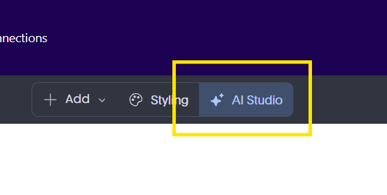
Open an existing report that you'd like to edit, select **Edit**, then click the **AI Studio** button.
****
#### Option 2 – Create a New Report
If you're creating a report from scratch:
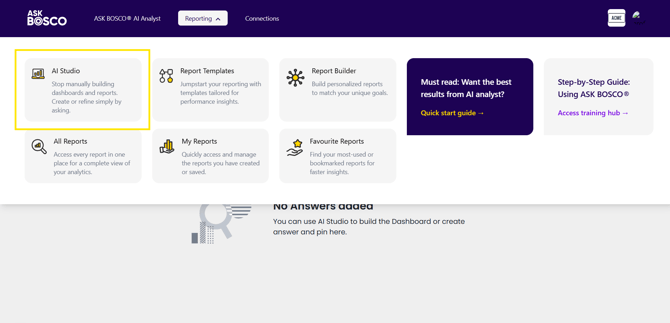
1. Open the **Reports** drop-down menu.
2. Select **AI Studio**.
3. Enter a name for your report and create it.
4. A blank report will open.
5. Click **Edit**, then select **AI Studio** to begin creating your report.
****
---
### Creating a Report with AI Studio
- #### Step 1: Open a Report in Edit Mode
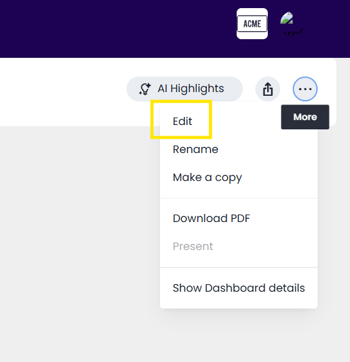
Navigate to the report you would like to edit and select **Edit**.
****
- #### Step 2: Open AI Studio
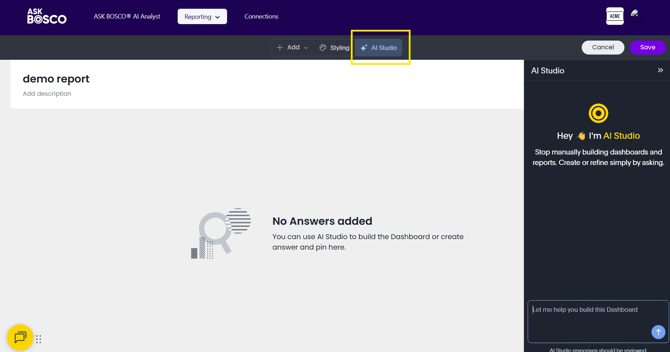
Select the **AI Studio** button.
The AI Studio panel will open, displaying:
- Suggested prompts
- Prompt input box
- Report creation options
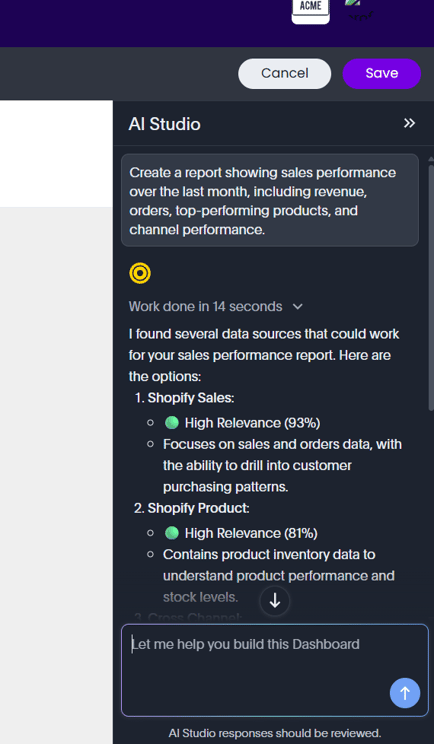
- #### Step 3: Enter Your Prompt
Provide a clear description of the report you'd like to create.
**Example:**
> Create a report showing sales performance over the last month, including revenue, orders, top-performing products, and channel performance.
****
- #### Step 4: Review the Proposed Plan
AI Studio may:
- Ask clarifying questions
- Request a dataset selection
- Present a proposed report structure
The plan may include:
- Tabs
- KPIs
- Visualisations
- Analysis sections
Review the plan and confirm before proceeding.
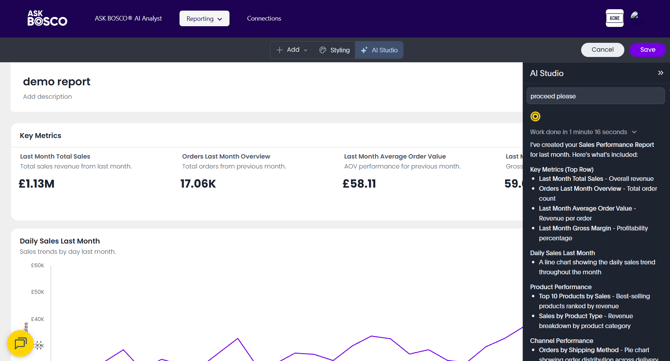
- #### Step 5: Generate the Report
Once confirmed, AI Studio will build the report automatically.
This may include:
- KPI tiles
- Tables
- Bar charts
- Line charts
- Filters
- Multiple report tabs
****
---
### Refining Your Report
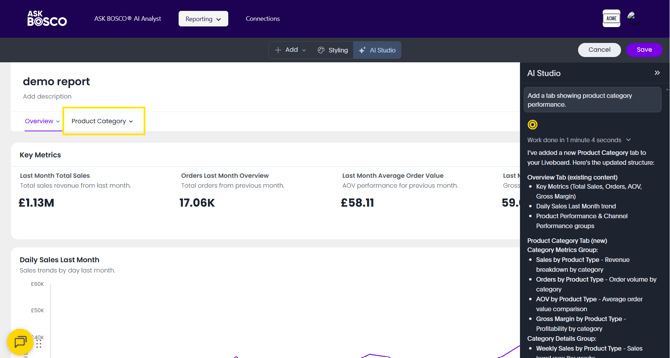
After creating a report, continue improving it using follow-up prompts.
Examples:
> Add a tab showing product category performance.
> Add a filter for device type.
> Change the colour scheme to use our brand colours.
> Create a separate tab for Paid Search performance.
AI Studio can continue modifying and improving reports after creation.
****
---
#### Sharing and Saving Reports
Reports created with AI Studio behave exactly like standard ASK BOSCO® reports.
You can:
- Save reports
- Share reports
- Schedule reports
- Continue editing manually
AI Studio simply accelerates the report creation process.
This article was created by Grace. If you have any questions or need a hand, feel free to reach out to us at [**team@askbosco.io**](mailto:team@askbosco.io)[mailto:team@askbosco.io](mailto:team@askbosco.io)

June 2026
- [FAQs](https://info.askbosco.io/knowledge/faqs?hsLang=en#main-content)
- [Onboarding](https://info.askbosco.io/knowledge/faqs?hsLang=en#onboarding)
- [Knowledge Hub](https://info.askbosco.io/knowledge/knowledge-hub?hsLang=en#main-content)
- [Getting Started](https://info.askbosco.io/knowledge/knowledge-hub?hsLang=en#getting-started)
- [Data Connections & Integrations](https://info.askbosco.io/knowledge/knowledge-hub?hsLang=en#data-connections-integrations)
- [Onboarding & Implementation](https://info.askbosco.io/knowledge/knowledge-hub?hsLang=en#onboarding-implementation)
- [Using the Reporting Tools](https://info.askbosco.io/knowledge/knowledge-hub?hsLang=en#using-the-reporting-tools)
- [Product Updates & Features](https://info.askbosco.io/knowledge/knowledge-hub?hsLang=en#product-updates-features)
- [ASK BOSCO® Training](https://info.askbosco.io/knowledge/ask-bosco-training?hsLang=en#main-content)
- [Getting Started With ASK BOSCO® Training](https://info.askbosco.io/knowledge/ask-bosco-training?hsLang=en#getting-started-with-ask-bosco-training)
- [Module 1 - Introduction & Overview](https://info.askbosco.io/knowledge/ask-bosco-training?hsLang=en#module-1-introduction-overview)
- [Module 2 - Report Features & Analytics Basics](https://info.askbosco.io/knowledge/ask-bosco-training?hsLang=en#module-2-report-features-analytics-basics)
- [Module 3 - Budget Planning & Allocation](https://info.askbosco.io/knowledge/ask-bosco-training?hsLang=en#module-3-budget-planning-allocation)
- [ASK BOSCO® AI Analyst](https://info.askbosco.io/knowledge/ask-bosco-training?hsLang=en#ask-bosco-ai-analyst)
- [ASK BOSCO® Shopify App](https://info.askbosco.io/knowledge/ask-bosco-shopify-app?hsLang=en#main-content)
- [Getting Started with Shopify](https://info.askbosco.io/knowledge/ask-bosco-shopify-app?hsLang=en#getting-started-with-shopify)
- [Shopify Reporting](https://info.askbosco.io/knowledge/ask-bosco-shopify-app?hsLang=en#shopify-reporting)
- [Product Releases](https://info.askbosco.io/knowledge/product-releases?hsLang=en)
- [Data connections](https://info.askbosco.io/knowledge/data-connections?hsLang=en)
- [Book a call with our team](https://modo25.com/book-a-call/)
[](https://askbosco.io/)
One Embankment, Neville Street. Leeds. LS1 4DW.
Tel: +[44 20 3355 6741](tel:44%2020%203355%206741)
[mailto:email@email.com](mailto:email@email.com)
Copyright © 2025, ASK BOSCO®