.png?width=260&height=102&name=ASKBOSCO_Logo_Grey_RGB%20(6).png)
What Is Drilling Down?
Drilling down lets you explore what’s behind a specific data point in a chart. For example, you might start with a high-level view of total sales by region, then drill into one region to see when sales were highest or which product categories drove performance.
Tip: Drilling down doesn’t permanently change your dashboard, it’s a way to interactively explore your data. Each time you reopen the dashboard, the original visualizations appear.
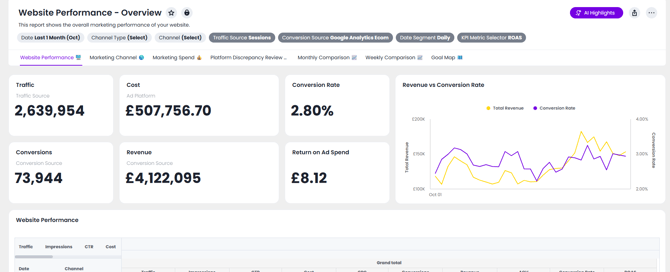
How to Drill Down into a Visualization
- Open your ASK BOSCO® dashboard
Navigate to the dashboard containing the chart you want to explore. - Right-click on a data point
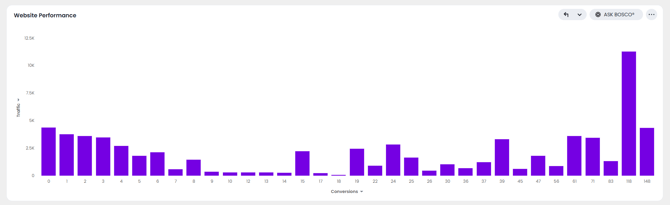
For example, right-click any data point in the “Website Performance” chart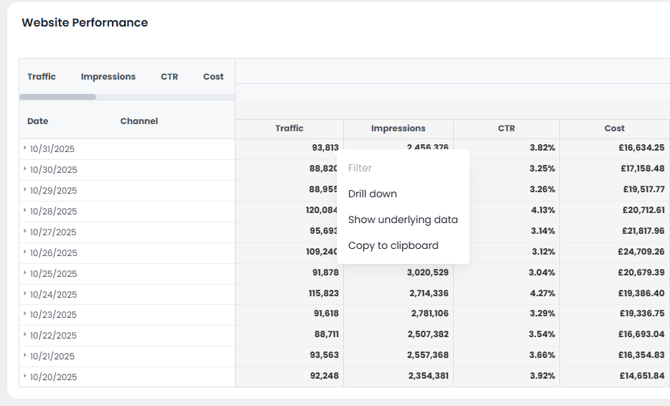
- Select “Drill Down”
In the dropdown menu, choose Drill Down, then select the field you want to drill with (for example, Date to explore when sales were highest in that region)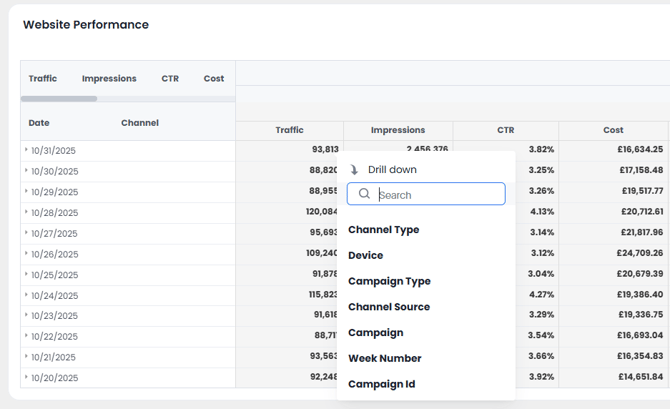
- View the updated chart
The visualization dynamically updates to show data filtered by your chosen field.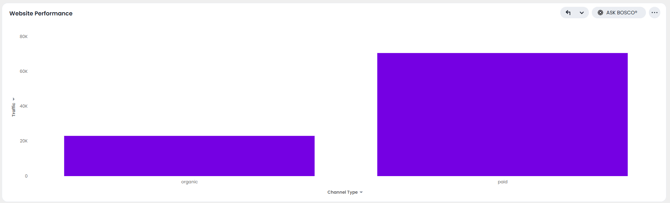
Going Deeper with Multiple Drill Layers
You can continue drilling into more layers to uncover deeper insights.
For example:
- After drilling into Website Performace by Channel Type,
- Right Click on to drill again by Conversions.
Each drill step updates the chart to reflect the subset of data you’re analyzing.
How to Drill Back Out
If you want to return to a previous view:
- Click the Undo button to go back one level at a time.
- Continue undoing until you return to the original chart view.
Key Takeaways
- Drilling down helps you explore visualized data interactively, one layer at a time.
- You can drill into as many levels as needed within a single chart.
- The original dashboard remains unchanged, your explorations are temporary and only visible to you.
Updated August 2026
This article was created by Grace. If you have any questions or need a hand, feel free to reach out to us at team@askbosco.io
