.png?width=260&height=102&name=ASKBOSCO_Logo_Grey_RGB%20(6).png)
This article covers
-
Understanding the Data
-
How ASK BOSCO® Search Tokens Work
-
Visualizations: The Building Blocks of Dashboards
-
Filters and Interactivity
-
Data Access and Sharing
-
Best Practices Before You Start
1. What Is an ASK BOSCO® Dashboard?
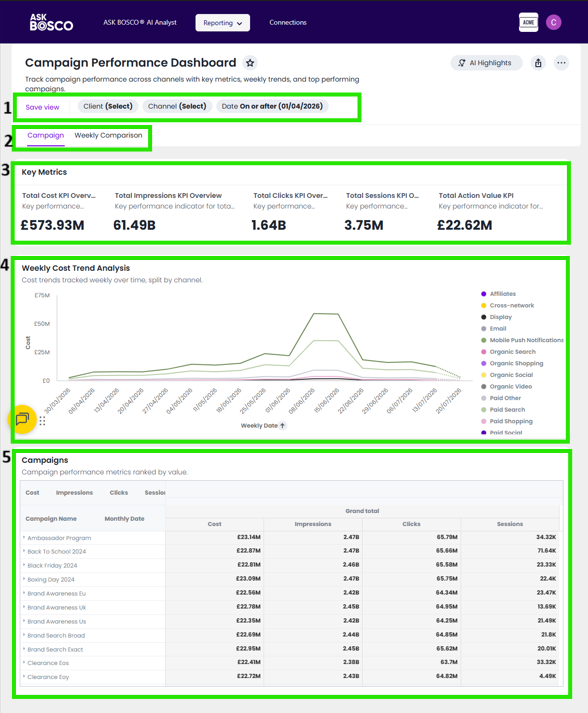
An ASK BOSCO® Dashboard is an interactive collection of charts and tables that update automatically as data changes.
Unlike traditional reports:
-
Dashboards are search-driven, not manually built from static visuals
-
They support data exploration, not just passive viewing
-
Each visualization is powered by a live query against your data
- Interactive filters and parameters
- Tabs show different areas of focus
- Summary of headline metrics & KPIs
- Line graphs showing the progression of different metrics and KPIs over time
- Detailed pivot tables of key metrics and KPIs
Key takeaway:
An ASK BOSCO® dashboard is a dynamic tool designed for asking and answering business questions—not a static report.
2. Understanding the Data You’re Searching
Before building a ASK BOSCO® dashboard, it’s important to understand the data source.
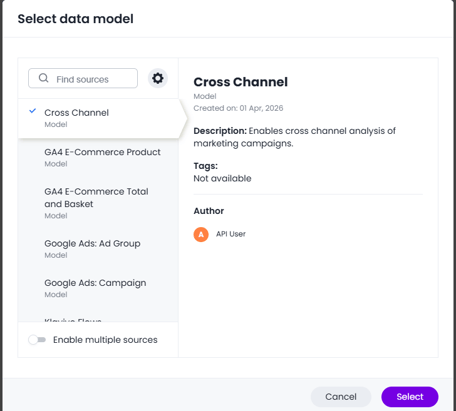
Data Sources
-
Data Sources are curated, business-friendly views of data
-
They often combine multiple tables and use familiar terminology
-
Business users will start with data sources
Attributes vs Measures
-
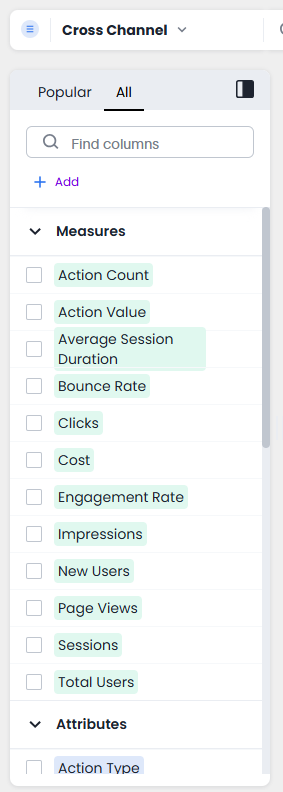
Attributes describe categories (e.g., Channel, Product, Campaign)
-
Measures are numeric values you analyze (e.g., Revenue, Units Sold)
Why This Matters
If results look incorrect, common reasons include:
-
Using the wrong data source
-
Grouping measures incorrectly
-
Data relationships affecting calculations
Tip: If you’re unsure which data source to use, choose one that is approved or commonly used by your team. Each data source has a description that will help you understand what it contains and how it can be used.
3. How ASK BOSCO® Search Tokens Work
ASK BOSCO® search tokens are designed to understand business intent rather than technical syntax.
You don’t need:
-
Special formatting
-
A specific word order
-
Technical query language
Example Search Tokens



ASK BOSCO® automatically:
-
Applies filters based on your words
-
Groups data logically
-
Suggests relevant visualizations
Key takeaway:
Think in terms of business questions, not report configurations.
4. Visualizations: The Building Blocks of Dashboards
A Visualization is a result of a search displayed as a chart or table.
In a Dashboard:
-
Each tile represents one saved visualization
-
The underlying search controls the data shown
-
Modifying the search updates the visual instantly
-png.png?width=1228&height=918&name=app-askbosco-io_connect_ask_dashboard_224d108a-7feb-4030-aa63-c21e636ae1e8%20(1)-png.png)
Choosing the Right Visualization
-
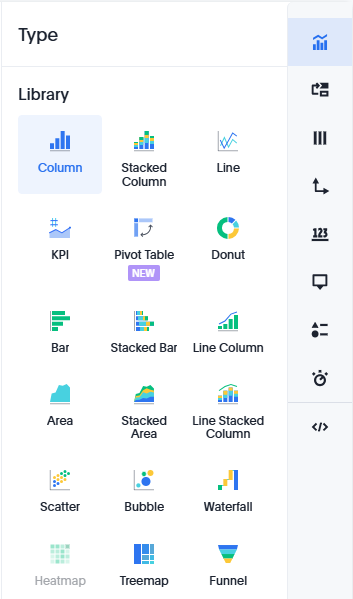
Use bar or column charts to compare values
-
Use line charts to show trends over time
-
Use tables when exact numbers are required
Tip: Start with a table to confirm accuracy, then switch to a visual.
5. Filters and Interactivity
Filters make dashboards interactive and easy to use.
Dashboard Filters
-
Apply to all tiles in the dashboard (unless you opt them out)
-
Help narrow analysis (e.g., Year, Region)
Runtime Filters
-
Allow viewers to interact without editing
-
Enable self-service exploration
Why this matters:
Well-designed filters allow stakeholders to answer follow-up questions on their own.
6. Data Access and Sharing
When you share a dashboard:
-
Users only see data they’re authorized to access
-
Security rules are applied automatically
-
No additional permission setup is required
Important:
If different users see different results on the same dashboard, it’s usually due to data access rules—not an error.
7. Best Practices Before You Start
Before creating a dashboard, consider the following:
-
✔ Select the correct data source
-
✔ Understand how each metric is defined
-
✔ Validate numbers using simple searches
-
✔ Design for exploration, not just presentation
A strong dashboard helps users ask better questions—not just view results.
Final Thought
ASK BOSCO® empowers users to explore data independently. By understanding how search tokens, data sources, and dashboards work together, you can create reports that are accurate, interactive, and genuinely valuable.
What This Article Didn’t Cover
This article focused on foundational concepts and did not cover:
-
Step-by-step dashboard creation Try this article
-
Advanced calculations Try this
-
Report Templates This article will explain more
These topics are best explored after you’re comfortable with the basics.
This article was prepared by Claire. If you have any questions please email team@askbosco.io

Updated July 2026