---
title: Awin Data Connection
description: How to connect Awin in ASK BOSCO & the Awin model and metrics available.
---
[Skip to content](https://info.askbosco.io/knowledge/awin-data-connection#main-content)
English
Show submenu for translations
[.png?width=260&height=102&name=ASKBOSCO_Logo_Grey_RGB%20(6).png)](https://app.askbosco.io/)
- [Book a call with our team](https://modo25.com/book-a-call/)
Open main navigation
Close main navigation
- [Book a call with our team](https://modo25.com/book-a-call/)
- English
Show submenu for translations
- [Contact us](mailto:team@askbosco.io)
[Contact us](mailto:team@askbosco.io)
How can we help you?
- There are no suggestions because the search field is empty.
1. [Here to Help](https://info.askbosco.io/knowledge?hsLang=en)
2. [Data connections](https://info.askbosco.io/knowledge/data-connections?hsLang=en)
# Awin Data Connection
## How to connect Awin in ASK BOSCO & the Awin data metrics available:
**How to connect:**
There are actions you need to complete in both ASK BOSCO and Awin.
**Awin guide**:
1. Go to https://ui.awin.com/user
2. Log in to the Awin account that has access to the account/s you want to connect
3. Navigate to the User icon in the top right next to User Dashboard, then click API Credentials in the dropdown menu
4. Put your Awin account password in and click Show my API token
5. Copy the OAuth2 Token in preparation for the ASK BOSCO steps
**ASK BOSCO guide:**
1. Go to the Connections tab and navigate to the Connector Library
2. Click Connect on the Awin tile
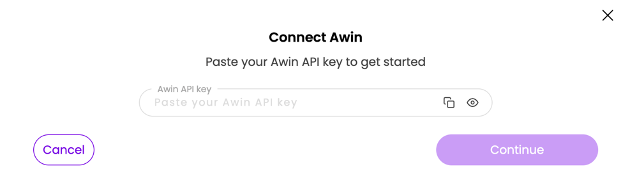
3. Paste your Awin API key, the OAuth2 Token you got from the Awin guide then click continue
4. Select the Awin account/s to connect
5. Put the start of your Financial calendar in the Start date section
6. Hit 'Connect'
7. Connection complete
### **Awin data model and metrics available in ASK BOSCO®**
**Awin model**
- **Date:** The specific day for which data is reported.
- **Publisher:** The affiliate partner (publisher) that drove the activity, as named in Awin.
- **Publisher ID:** Awin's numeric identifier for the publisher.
- **Product:** Product name from the transaction basket, where basket tracking is enabled.
- **Product SKU:** Product SKU from the transaction basket.
- **Product Category:** Product category from the transaction basket.
- **Advertiser ID:** Awin's identifier for your advertiser programme.
- **Sale Value:** Affiliate revenue in reporting currency. Filter by Part Status: approved is realised revenue; declined is never paid.
- **Commission Value:** Commission owed to publishers in reporting currency. Filter by Part Status.
- **Clicks:** The number of times users clicked on an ad or link.
- **Bonus Commission:** Bonus commission payments in reporting currency. The only source of bonus values for Awin.
- **Network Fee:** The Awin network fee charged per transaction, in reporting currency.
- **Product Quantity:** Units per basket product line. Indicative product attribution, not a revenue source.
- **Product Sale Value:** Indicative value of the basket product line. Use Sale Value for revenue reporting.
- **Transaction Status:** Commission status at transaction level (pending, approved, declined). Use for transaction counts; use Part Status for money.
- **Part Status:** Commission status of the commission-group part. The status filter for Sale Value and Commission Value.
- **Transaction Type:** Split orders into the different types; Sale, Return, Shipping, Adjustment
- **Transaction Campaign:** Campaign attached to the Awin transaction, where the publisher tags one. Sparsely populated.
- **Performance Campaign:** The name of the marketing campaign that drove traffic to the site, sourced from Google Ads, GA4, or data from other ad platforms.
- **Commission Group:** The Awin commission group the sale part belongs to.
- **Currency:** Original transaction currency.
- **Click Device:** Device of the click that drove the transaction.
- **Conversion Device:** Device used at the point of purchase.
- **Transactions:** Distinct affiliate orders (transactions).
- **Effective Commission Rate:** Commission as a percentage of sale value.
- **Average Order Value:** Average revenue per conversion event.
- **Conversion Rate %:** Transactions per click, as a percentage.
- **Earnings per Click:** Commission earned per click.
- **Total Commission:** Commission plus bonus - your publishers' total earnings.
- **Approved Sale Value:** Sale value where the part status is approved (realised revenue).
- **Approved Commission Value:** Commission where the part status is approved.
- **Pending Sale Value:** Sale value awaiting Awin validation (pending).
- **Pending Commission Value:** Commission awaiting Awin validation (pending).
- **Declined Sale Value:** Sale value that was declined - reversed and never paid.
- **Declined Commission Value:** Commission that was declined - reversed and never paid.
- **Approved Transactions:** Distinct transactions with approved status.
- **Pending Transactions:** Distinct transactions awaiting validation.
- **Declined Transactions:** Distinct transactions that were declined.
- **Deleted Sale Value:** Sale value on transactions Awin removed - never paid.
- **Deleted Commission Value:** Commission on transactions Awin removed - never paid.
- **Deleted Transactions:** Distinct transactions Awin removed.
- [FAQs](https://info.askbosco.io/knowledge/faqs?hsLang=en#main-content)
- [Onboarding](https://info.askbosco.io/knowledge/faqs?hsLang=en#onboarding)
- [Knowledge Hub](https://info.askbosco.io/knowledge/knowledge-hub?hsLang=en#main-content)
- [Getting Started](https://info.askbosco.io/knowledge/knowledge-hub?hsLang=en#getting-started)
- [Data Connections & Integrations](https://info.askbosco.io/knowledge/knowledge-hub?hsLang=en#data-connections-integrations)
- [Onboarding & Implementation](https://info.askbosco.io/knowledge/knowledge-hub?hsLang=en#onboarding-implementation)
- [Using the Reporting Tools](https://info.askbosco.io/knowledge/knowledge-hub?hsLang=en#using-the-reporting-tools)
- [Product Updates & Features](https://info.askbosco.io/knowledge/knowledge-hub?hsLang=en#product-updates-features)
- [ASK BOSCO® Training](https://info.askbosco.io/knowledge/ask-bosco-training?hsLang=en#main-content)
- [Getting Started With ASK BOSCO® Training](https://info.askbosco.io/knowledge/ask-bosco-training?hsLang=en#getting-started-with-ask-bosco-training)
- [Module 1 - Introduction & Overview](https://info.askbosco.io/knowledge/ask-bosco-training?hsLang=en#module-1-introduction-overview)
- [Module 2 - Report Features & Analytics Basics](https://info.askbosco.io/knowledge/ask-bosco-training?hsLang=en#module-2-report-features-analytics-basics)
- [Module 3 - Budget Planning & Allocation](https://info.askbosco.io/knowledge/ask-bosco-training?hsLang=en#module-3-budget-planning-allocation)
- [ASK BOSCO® AI Analyst](https://info.askbosco.io/knowledge/ask-bosco-training?hsLang=en#ask-bosco-ai-analyst)
- [ASK BOSCO® Shopify App](https://info.askbosco.io/knowledge/ask-bosco-shopify-app?hsLang=en#main-content)
- [Getting Started with Shopify](https://info.askbosco.io/knowledge/ask-bosco-shopify-app?hsLang=en#getting-started-with-shopify)
- [Shopify Reporting](https://info.askbosco.io/knowledge/ask-bosco-shopify-app?hsLang=en#shopify-reporting)
- [Product Releases](https://info.askbosco.io/knowledge/product-releases?hsLang=en)
- [Data connections](https://info.askbosco.io/knowledge/data-connections?hsLang=en)
- [Book a call with our team](https://modo25.com/book-a-call/)
[](https://askbosco.io/)
One Embankment, Neville Street. Leeds. LS1 4DW.
Tel: +[44 20 3355 6741](tel:44%2020%203355%206741)
[mailto:email@email.com](mailto:email@email.com)
Copyright © 2025, ASK BOSCO®