.png?width=260&height=102&name=ASKBOSCO_Logo_Grey_RGB%20(6).png)
What it does
Personal Memory is what AI Analyst knows about you as a user. It's not about your data; it's about you. Personal Memory applies only to your own sessions, and has no effect on how AI Analyst answers anyone else.
You teach AI Analyst by simply telling it what you want it to remember. Nothing is saved passively; context is only stored when you explicitly ask AI Analyst to remember something.
Personal Memory works in two layers:
- Your profile: who you are and how you want to interact with AI Analyst, regardless of which data model you're querying. For example, your role, region, team, or output preferences. Your profile applies in every session.
- Data model-specific context: personal preferences, scoping, and definitions tied to a specific data model. For example, your own definition of a term, or a filter that should always apply when you query a particular model. This layer only applies when you're querying that model.
Why it's useful
- No more repeating yourself. Rather than re-explaining your role, region, or preferences every time, Personal Memory applies what you've already told AI Analyst automatically.
- A more personalised experience. Answers are framed around your role, focus, and preferences, instead of giving everyone the same generic response.
- Your own definitions, without affecting anyone else. Different users often use the same term to mean different things. Personal Memory lets you define terms on your own terms, scoped to the data model you're querying, without changing how AI Analyst responds to other users.
How to use it
- Open AI Analyst and start a conversation.
- Tell it what you want it to remember, for example: "I'm Head of CS for EMEA."
- AI Analyst confirms what it's saved.
- To see what it knows about you, ask "What do you know about me?"
- To correct or remove something, just say so in conversation, for example: "My region is now DACH, not EMEA" or "Forget that my region is EMEA."
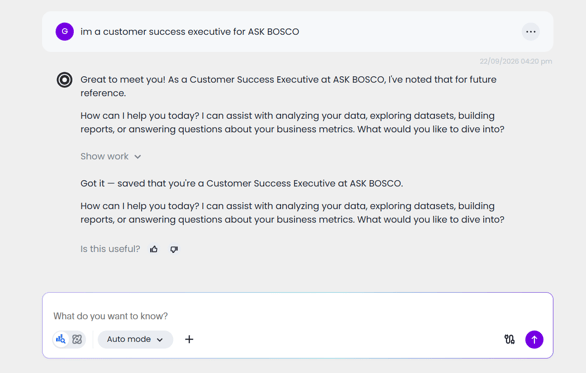
What you can teach it
Teach once, applied every session. Once saved, personal context is applied automatically going forward, with no need to repeat it. For example:
- "I'm Head of CS for EMEA, focused on renewals": AI Analyst frames every response through that lens from then on.
- "Always show me tables, not charts": AI Analyst returns tabular output by default.
- "When I say my accounts, filter to my EMEA book": AI Analyst applies that filter automatically.
Definitions that stay specific to each data model. Personal definitions can differ across data models, and AI Analyst keeps them separate. For example, you could define "performance" differently on a sales model versus a customer success model, and AI Analyst will apply the right definition depending on which model you're querying.
Easy to view, correct, or delete. You manage all of this through conversation:
- "What do you know about me?": AI Analyst summarises everything it's saved about you.
- "My region is now DACH, not EMEA.": AI Analyst updates the entry and confirms.
- "Forget that my region is EMEA.": AI Analyst deletes that specific memory.
Who this helps
Ecommerce and trading managers can save data source preferences once, for example: "when I ask about revenue, always use Shopify" or "for sessions, use GA4", so AI Analyst pulls from the right source without being told each time.
SEO managers can set organic performance questions to always use Google Search Console rather than GA4, and save role context like "I focus on non-brand organic performance" so answers are framed around what matters most to them.
Senior stakeholders and executives can save their role and focus area once, for example: "I'm the CMO, focused on brand and acquisition", and get answers framed at the right level without re-explaining each session. Prefer short, no-preamble answers? Save that once and it'll apply automatically too.
Good to know
- Personal Memory is org-specific. It applies to you within a particular org and doesn't carry across to other orgs you might have access to. If you work across multiple orgs, for example as an agency account manager with separate client instances, you'll need to set up Personal Memory separately in each one. You can ask "What do you know about me?" in one org to quickly see what to copy across to another.
- No dedicated management screen yet. Personal Memory can currently only be viewed, corrected, or deleted through conversation with AI Analyst; there's no separate settings page for it.
- Doesn't currently apply to AI Studio. When building reports in AI Studio, your Personal Memory isn't taken into account.
- Only saved when you say so. AI Analyst doesn't infer your preferences from how you ask questions; context is only stored when you explicitly ask it to remember something.
- Not visible to admins. Admins can't view an individual user's saved Personal Memory.
- No bulk import. There's currently no way to bulk-import personal context; it's built up through conversation.
This article was created by Grace. If you have any questions or need a hand, feel free to reach out to us at team@askbosco.io

September 2026